- Home Page /
- Electronics /
- Computer Accessories /
- Computer Accessories & Peripherals /
- Keyboards, Mice & Accessories /
- Computer Keyboards /
- Logickeyboard Slim Line Keyboard for Adobe Au...
0 ratings




Item #:
257652
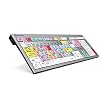
Logickeyboard Slim Line Keyboard for Adobe Audition - PC
Item #:
257652
DKK 1349
Price Details
Excluding Shipping & Custom charges ( Shipping and custom charges will be calculated on checkout )
*All items will import from US
0 ratings
Write a review
In stock
 Imported from USA store
QTY:
Only 10 items left in stock.
Order now and get it around Wednesday, July 01
Secured transaction
Ubuy works hard to protect your security and privacy. Our advanced payment security system ensures confidentiality by encrypting your information during transmission using AES (Advanced Encryption Standards) and SSL (Secure Socket Layer) protocols. Your payment details are 100% secure as we do not share your payment details with third party sellers.
Our Top Logistics Partners


A comfortable and convenient keyboard specifically designed for Adobe Photoshop CC on PC, with easy setup and two USB hubs for versatile desktop expansion.

Fast
Shipping

Free
Return*

Secure Packaging

100% Original Products

PCI DSS Compliance

ISO 27001 Certified


Note: Step Down Voltage Transformer required for using electronics products of US store (110-120). Recommended power converters Buy Now.


What Stands Out
Photoshop Shortcuts
This slim line keyboard features vital Photoshop shortcuts, making it easier for designers to enhance productivity and workflow efficiency when creating or editing graphics.
Windows Compatibility
Designed specifically for Windows 7-10, this keyboard ensures seamless integration, providing a tailored user experience for PC users, especially those working in creative environments.
Compact Design
Its slim and compact form factor saves desk space while maintaining ergonomic comfort, ideal for professionals and enthusiasts who require both functionality and style in their workspace.
Product Details
- Designed for Adobe Photoshop CC on Windows 7-11
- USB connectivity with 2 built-in 2.0 Full Speed ports
- Ergonomic design with soft touch keystroke for all-day comfort
- Shortcut keyboard for faster and simpler control of Photoshop CC
- Ideal for creative media production professionals
- Stylish low-profile keyboard with state-of-the-art scissor switch mechanism and low noise typing
| Compatible Devices | PC |
| Connectivity Technology | USB, USB-A |
| Additional Features | Ergonomic |
| Power Source | USB |
| Switch Type | Mechanical |
| Keyboard Layout | QWERTY |
| Hand Orientation | Ambidextrous |
| Button Quantity | 78 |
| Mechanical Keyboard Switch Model | Mechanical |
| Compatible Operating System Family | Windows |
| Is Electric | Yes |
| Number of Keys | 5 |
| Color | Multicoloured |
| Style Name | Boom microphone stand with a telescoping boom arm |
| Theme | RGB |
| Item Dimensions L x W x H | 18"L x 6"W x 1.5"H (45.7 x 15.2 x 3.8 cm) |
| Enclosure Material | Stainless Steel |
| Brand | Logickeyboard |
| Keyboard Description | Ergonomic |
| Antenna Location | Audio Production |
| Built-In Media | USB Cable |
| Model Number | LKBU-PHOTOCC-AJPU-US |
| Model Name | Logickeyboard Designed for Adobe Photoshop CC - PC Slim Line Keyboard |
| Unit Count | 1.0 Count |
| Manufacturer | LogicKeyboard |
| UPC | 845173002624 845173002730 642892818839 700315910772 |
| Mfr Part Number | LKBU-PHOTOCC-AJPU-US |
| Item Weight | 2.48 Pounds (1.12 kg) |
| Recommended Uses For Product | Audio Production |
| Special Feature | Ergonomic |
| Style | Boom microphone stand with a telescoping boom arm |
| Product Dimensions (L x W x H) | 18"L x 6"W x 1.5"H (45.7 x 15.2 x 3.8 cm) |
| Material | Stainless Steel |
Who Should Buy?

-
Graphic Designers
Ideal for graphic designers who frequently use Adobe Photoshop, enhancing efficiency with easy access to essential shortcuts.
-
Photography Professionals
Beneficial for photographers editing images, allowing quick adjustments and streamlined workflow within Photoshop.
-
Students & Learners
Great for students learning Photoshop, providing intuitive key labels that simplify the learning process and increase productivity.

-
Casual Users
Not ideal for casual users who rarely use Photoshop, as they may not utilize the specialized features effectively.
-
Mac Users
Incompatible with Mac systems, limiting usability for Mac users who want to work with Adobe Photoshop.
-
Gaming Enthusiasts
Not suitable for gamers looking for a keyboard optimized for gaming performance, as it's focused on design software shortcuts.
Product Description
Have any Query? Chat with us
Customer Questions & Answers
-
Question:
What is the unique feature of the Logickeyboard designed for Adobe Photoshop CC?
Answer: The Logickeyboard designed for Adobe Photoshop CC features a slimline design with color-coded keys specifically tailored for Photoshop functions. This allows users to navigate the software more intuitively, enhancing their workflow. The keyboard's specialized layout helps both beginners and experienced users to execute commands efficiently, making it an essential tool for graphic designers and photographers who rely on Photoshop for editing tasks. -
Question:
Is the Logickeyboard compatible with Mac, or is it only for PC?
Answer: This specific model, the Logickeyboard LKBU-PHOTOCC-AJPU-US, is optimized for Windows PC, particularly compatible with Windows 7 to 10. However, it's important to verify the exact model if you are a Mac user, as there are other versions specifically designed for macOS. For Windows users, this keyboard ensures seamless integration with Adobe Photoshop, providing direct access to shortcuts for enhanced productivity. -
Question:
How does the design of the Logickeyboard enhance usability for Photoshop users?
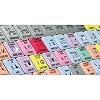
Answer: The design of the Logickeyboard includes color-coded keys that correspond to Photoshop's functions. This visual aid helps users quickly identify shortcuts without memorizing them, reducing the learning curve associated with the software. For instance, a user can swiftly access layers, filters, and tools, significantly improving efficiency during design tasks and allowing them to focus more on creativity rather than navigating the software. -
Question:
What type of connection does the Logickeyboard use?
Answer: The Logickeyboard LKBU-PHOTOCC-AJPU-US uses a USB connection, providing a reliable and straightforward method to connect to your PC. This plug-and-play capability ensures that users can quickly set up their keyboard without complicated installations. This feature is particularly beneficial for users who frequently switch computers or travel between different workstations, allowing for uninterrupted workflow. -
Question:
Can the Logickeyboard function be customized for other applications?
Answer: While the Logickeyboard is specifically designed for Adobe Photoshop CC, its physical design allows users to customize keystrokes within the application itself. Advanced users can even modify preferences to suit other Adobe programs, such as Illustrator or InDesign, maximizing the keyboard's versatility. With this adaptability, many creative professionals appreciate the investment, as it can become an integral part of multiple software environments. -
Question:
What materials are used in the construction of the Logickeyboard?
Answer: The Logickeyboard is made from high-quality materials that ensure durability and longevity. Its keys are designed to withstand heavy use, providing a tactile feedback experience that enhances typing comfort. This robustness is ideal for designers who spend long hours on projects, as it ensures that the keyboard remains functional over extended periods, making it a worthwhile addition to any design setup. -
Question:
Is the Logickeyboard designed for gaming as well?
Answer: The Logickeyboard is optimized primarily for graphic design and photo editing tasks in Adobe Photoshop, rather than gaming. Although gamers may find the ergonomic design appealing, the key layout and functionality focus on design-focused applications. For users who engage in both gaming and design work, it may be worthwhile to consider a separate keyboard tailored specifically for gaming needs to ensure peak performance in both areas. -
Question:
What demographic benefits most from using the Logickeyboard?
Answer: Graphic designers, digital artists, and photographers are the primary demographics that benefit from the Logickeyboard designed for Adobe Photoshop CC. This keyboard caters to both novices and professionals, offering features that assist in learning and refining skills for efficient photo editing. Students in design programs may also find this keyboard invaluable as they become more proficient in Photoshop, fostering a more productive learning environment. -
Question:
Are the keys backlit for use in low-light conditions?
Answer: The Logickeyboard LKBU-PHOTOCC-AJPU-US does not feature backlit keys, as its design prioritizes functionality for professional use. While this may limit visibility in low-light settings, many users in creative fields often work in well-lit environments. If low-light operation is a key requirement for your tasks, you may want to explore other keyboard options that offer backlighting features. -
Question:
Where can I buy the Logickeyboard designed for Adobe Photoshop CC?
Answer: You can purchase the Logickeyboard Designed for Adobe Photoshop CC on Ubuy, which offers a user-friendly platform for acquiring this specialized keyboard. Ubuy provides access to a wide variety of electronic products, ensuring that you can find the right version of the Logickeyboard tailored to your needs.
Logickeyboard Keyboards LKBU-PHOTOCC-AJPU-US Editorial Review
The Logickeyboard for Adobe Photoshop CC is a great keyboard that works as advertised. However, it lacks support for computer wake-up issues and customer support is non-responsive. The keyboard is solidly built and heavy, with helpful shortcuts for Photoshop and Illustrator. The coloring of the keys may take some time to get used to, but overall, it is an awesome product that makes typing effortless.
Customer Reviews & Ratings
13 customers ratings
-
5 Star
80%
-
4 Star
20%
-
3 Star
0%
-
2 Star
0%
-
1 Star
0%
Review this product
Share your thoughts with other customers
Pros
- Works as advertised
- Solid build and heavy
- Helpful shortcuts for Photoshop and Illustrator
- Effortless typing
Cons
- No support for computer wake-up issues
Product Price History
Important information
- Limitations : For products shipped internationally, please note that any manufacturer warranty may not be valid; manufacturer service options may not be available; product manuals, instructions, and safety warnings may not be in destination country languages; the products (and accompanying materials) may not be designed in accordance with destination country standards, specifications, and labeling requirements; and the products may not conform to destination country voltage and other electrical standards (requiring use of an adapter or converter if appropriate). The recipient is responsible for assuring that the product can be lawfully imported to the destination country. When ordering from Ubuy or its affiliates, the recipient is the importer of record and must comply with all laws and regulations of the destination country.
- Not all the products listed on Ubuy are for sale, as Ubuy is a global search engine. Products are subject to export/trade regulations.
DKK 1349
Order now and get it around Wednesday, July 01
This item is not restrict in my country.(Please click on above link if this item is not restrict in your country, So our team will review and allow.)
QTY:
Only 10 items left in stock.
Secured transaction
Ubuy works hard to protect your security and privacy. Our advanced payment security system ensures confidentiality by encrypting your information during transmission using AES (Advanced Encryption Standards) and SSL (Secure Socket Layer) protocols. Your payment details are 100% secure as we do not share your payment details with third party sellers.
Our Top Logistics Partners
Fastest cross-border delivery
Features & Benefits
- Comfortable and convenient keyboard
- Specifically designed for Adobe Photoshop CC on PC
- Easy to set up with no software required
- Two built-in USB 2.0 Full Speed ports for desktop expansion
- Enhanced scissor-key-switches and thin keycaps for sensitive and responsive touch
- Ideal for all-day use