- Home Page /
- Office Products /
- Office Electronics /
- Printers & Accessories /
- Computer Printers /
- Label Printers /
- Brother P-Touch QL-500 Direct Thermal Label P...
0 ratings

Item #:
78674962
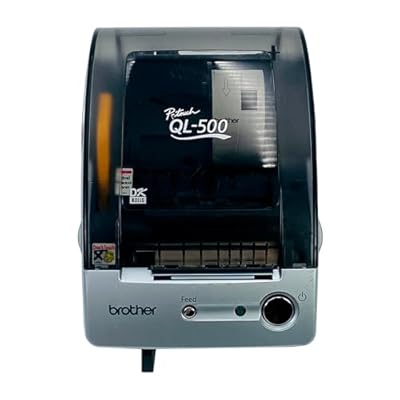
Brother P-Touch QL-500 Direct Thermal Label Printer USB 300 dpi
Item #:
78674962
DKK 3153
Price Details
Excluding Shipping & Custom charges ( Shipping and custom charges will be calculated on checkout )
*All items will import from US
0 ratings
Write a review
In stock
 Imported from USA store
QTY:
Order now and get it around Thursday, June 25
Secured transaction
Ubuy works hard to protect your security and privacy. Our advanced payment security system ensures confidentiality by encrypting your information during transmission using AES (Advanced Encryption Standards) and SSL (Secure Socket Layer) protocols. Your payment details are 100% secure as we do not share your payment details with third party sellers.
Our Top Logistics Partners


The Brother P-Touch QL-500 is a thermal label printer perfect for home or office use.

Fast
Shipping

Free
Return*

Secure Packaging

100% Original Products

PCI DSS Compliance

ISO 27001 Certified


Note: Step Down Voltage Transformer required for using electronics products of US store (110-120). Recommended power converters Buy Now.


What Stands Out
High-Resolution Printing
Delivers sharp 300 dpi labels, ensuring clear text and graphics for professional presentations and organization needs.
Direct Thermal Technology
Eliminates the need for ink or toner, reducing ongoing costs and maintenance, making label printing efficient and hassle-free.
USB Connectivity
Easy plug-and-play setup with USB compatibility to seamlessly connect with computers, enhancing usability for both home and office environments.
Product Details
- Brother P-Touch QL-500 Direct Thermal Label Printer with USB connectivity
- 300 dpi maximum resolution for crisp and clear printouts
- Print speed of up to 212.6 inch/min for faster printing
- Built-in Sharp Manual Tape Cutter for clean label cuts
- Thermal print technology for premium quality images
- Zoom feature for previewing labels and layouts before printing
| Item Weight | 3.5 lbs (1.59 kg) |
Who Should Buy?

-
Small Businesses
Ideal for small businesses needing quick, high-quality labels for product, shipping, and organization purposes.
-
Home Office Users
Perfect for home offices looking to streamline workflow with professional-looking labels for documents and supplies.
-
Event Planners
Great for event planners requiring customizable labels for invitations, name tags, and signage to enhance their events.

-
High Volume Needs
Not suitable for environments requiring high-volume label production, as its speed may not meet demanding workflows.
-
Specialty Label Users
Limited compatibility with specialty labels like custom shapes or materials, which may hinder some users' specific needs.
-
Mobile Use
Not ideal for users needing portable solutions, as it lacks battery power for on-the-go label printing.
Product Description
Brother P-Touch QL-500 Direct Thermal Label Printer USB 300 dpi
About This Item
Introducing the Brother P-Touch QL-500 Direct Thermal Label Printer USB 300 dpi The Brother P-Touch QL-500 is a sleek and efficient label printer that will revolutionize the way you handle your labeling needs. With its high-quality printing capabilities and user-friendly features, this device is perfect for small businesses, offices, and even personal use. With the Brother QL-500 Label Printer, you can easily create professional-looking labels for a variety of purposes. Whether you need to label folders, binders, packages, or even jars, this printer delivers crisp and clear prints with a resolution of 300 dpi.
Say goodbye to messy handwriting and smudged ink - these labels are designed to withstand the test of time. Thanks to its direct thermal printing technology, the QL-500 requires no ink or toner cartridges. Simply connect the printer to your computer using the included USB cable and you're ready to go. This saves you time and money, as you won't have to worry about constantly replenishing ink supplies. The QL-500 also comes with user-friendly software that allows you to easily customize your labels.
From choosing fonts and graphics to adding barcodes and serial numbers, the possibilities are endless. You can even import data from Microsoft Excel or CSV files for quick and easy bulk labeling. Designed with convenience in mind, this Brother P-Touch Printer features an automatic cutter that neatly trims your labels to the desired length. You can create varying label sizes, from small address labels to large shipping labels, with ease.
The printer supports label widths from 0.5 to 2.4 inches, giving you the flexibility to handle a wide range of labeling tasks. Don't let complicated labeling processes slow you down. Invest in the Brother P-Touch QL-500 Direct Thermal Label Printer and experience the convenience and efficiency it brings to your labeling needs. Order yours today and start enjoying hassle-free labeling like never before.
Have any Query? Chat with us
Customer Questions & Answers
-
Question:
What is the print speed of the Brother P-Touch QL-500 Direct Thermal Label Printer?
Answer: The Brother P-Touch QL-500 boasts a print speed of up to 68 labels per minute. This rapid printing capability is perfect for businesses or home users who need to generate labels quickly for inventory, shipping, or organization purposes. Whether you’re preparing labels for mailing, product identification, or more, the QL-500 keeps your workflow efficient. -
Question:
What types of labels can I print with the Brother P-Touch QL-500?
Answer: You can print a range of labels including address labels, file folder labels, and name badges with the Brother P-Touch QL-500. It supports various label formats and sizes, allowing for customization according to your needs. This versatility makes it an ideal choice for organizing office materials, sending packages, or crafting personalized labels for events. -
Question:
How does the direct thermal printing technology work?
Answer: Direct thermal printing uses heat to produce images on specially coated thermal paper. The Brother P-Touch QL-500 applies heat through a print head to create the desired text or image. Unlike inkjet printers, this technology eliminates the need for ink or toner, providing a cost-effective solution for label printing. It's especially beneficial for users who require straightforward, mess-free label creation. -
Question:
Is the Brother P-Touch QL-500 compatible with my computer?
Answer: Yes, the Brother P-Touch QL-500 is compatible with both Windows and Mac operating systems. It connects via USB for easy installation, enabling seamless integration with your computer for effortless label design and printing. This compatibility makes it user-friendly for a wide variety of applications such as kid’s school projects, home organization, or small business needs. -
Question:
Can I customize labels using the Brother P-Touch QL-500?
Answer: Absolutely! The Brother P-Touch QL-500 allows for extensive label customization through its user-friendly software. Users can design labels with different fonts, styles, and graphics to suit their specific needs. This makes the printer perfect for branding, personalizing gifts, or even crafting unique decorative labels for events. -
Question:
What is the maximum label width supported by the Brother P-Touch QL-500?
Answer: The Brother P-Touch QL-500 supports labels with a maximum width of 2.4 inches. This wide format allows for larger print areas to include detailed text or graphics, making it suitable for various applications like shipping labels or larger product tags. Utilizing this feature ensures your labels stand out and contain all necessary information clearly. -
Question:
How do I set up the Brother P-Touch QL-500 for the first time?
Answer: Setting up your Brother P-Touch QL-500 is straightforward. Start by connecting the printer to your computer using the supplied USB cable. Then, install the necessary software from Brother’s official website or via the included disk. Lastly, load the label roll, and you’re ready to start designing and printing your first label. This efficient setup process makes it accessible to all users. -
Question:
Does the Brother P-Touch QL-500 come with any labeling software?
Answer: Yes, the Brother P-Touch QL-500 comes with P-touch Editor software, which facilitates easy design and printing of labels. This software enables users to create custom labels with various design elements, including text, images, and predefined templates. Utilizing this software can significantly enhance productivity for labeling tasks, making the experience user-friendly and effective. -
Question:
What kind of maintenance does the Brother P-Touch QL-500 require?
Answer: Minimal maintenance is needed for the Brother P-Touch QL-500. Regularly clean the print head and ensure that the label stock is loaded correctly to prevent jams. Periodic checks will help keep the printer in optimal working condition, ensuring longevity and consistent print quality. This ease of maintenance is one of the printer’s standout features for busy users. -
Question:
Where can I buy the Brother P-Touch QL-500 Direct Thermal Label Printer in KSA?
Answer: You can purchase the Brother P-Touch QL-500 Direct Thermal Label Printer from Ubuy in Faroe Islands. They offer a wide selection of electronic products, including printers and accessories, ensuring you find exactly what you need for your labeling tasks.
Tekswamp Label Printers Editorial Review
No editorial reviews found
Customer Reviews & Ratings
1 customers ratings
-
5 Star
100%
-
4 Star
0%
-
3 Star
0%
-
2 Star
0%
-
1 Star
0%
Review this product
Share your thoughts with other customers
Pros
- High-resolution printing (300 dpi)
- Fast print speeds (up to 51 labels/min)
- User-friendly with easy software
- Versatile label sizes and types
- Compact design saves desk space
Cons
- Limited built-in label templates
Product Price History
Important information
- Limitations : For products shipped internationally, please note that any manufacturer warranty may not be valid; manufacturer service options may not be available; product manuals, instructions, and safety warnings may not be in destination country languages; the products (and accompanying materials) may not be designed in accordance with destination country standards, specifications, and labeling requirements; and the products may not conform to destination country voltage and other electrical standards (requiring use of an adapter or converter if appropriate). The recipient is responsible for assuring that the product can be lawfully imported to the destination country. When ordering from Ubuy or its affiliates, the recipient is the importer of record and must comply with all laws and regulations of the destination country.
- Not all the products listed on Ubuy are for sale, as Ubuy is a global search engine. Products are subject to export/trade regulations.
DKK 3153
Order now and get it around Thursday, June 25
This item is not restrict in my country.(Please click on above link if this item is not restrict in your country, So our team will review and allow.)
QTY:
Secured transaction
Ubuy works hard to protect your security and privacy. Our advanced payment security system ensures confidentiality by encrypting your information during transmission using AES (Advanced Encryption Standards) and SSL (Secure Socket Layer) protocols. Your payment details are 100% secure as we do not share your payment details with third party sellers.
Our Top Logistics Partners
Fastest cross-border delivery
Features & Benefits
- Thermal label printer ideal for home or office use
- Fast print speed of up to 212.6 inch/min
- Maximum resolution of 300 x 300dpi for crisp and clear printouts
- Sharp Manual Tape Cutter for clean label cut after printing
- Premium quality images with dependable performance
- Zoom feature for previewing labels and layouts before printing